

Staking SOL from a phone used to mean compromising on yield visibility, validator choice, or withdrawal speed, but that tradeoff has narrowed considerably over recent years. Wallets now support native and liquid staking directly on mobile, and a new class of apps treats staking as the primary experience instead of a secondary feature buried inside a general-purpose wallet.
With Solana Mobile now supporting hundreds of apps in its dApp Store and a growing installed base of Seeker devices, mobile staking is no longer a convenience compromise. It is a credible way to earn yield on SOL.
The best app for you depends on what you prioritize: raw yield, validator control, withdrawal flexibility, or simplicity. After evaluating four leading options on those criteria, Sanctum stands out for users who want a high-yield, mobile-first experience with daily rewards and no lock-up periods.
What Is Solana Staking?
Solana uses proof-of-stake consensus, which means the network relies on validators to process transactions and maintain security. SOL holders participate by delegating their tokens to a validator, and in return they receive a share of the rewards the network distributes. Delegating does not transfer ownership; your SOL stays in your control.
According to Solana's official staking guide, native staking typically earns approximately 5% to 7% APY. Unstaking natively takes roughly 2 to 3 days. Liquid staking is a separate method where users receive a token representing their staked SOL, which can be used in other applications while still earning rewards.
→ Learn more about staking SOL
Why Mobile Staking is Growing
More wallets and dedicated apps now support staking workflows on phones. Solana Mobile expanded mobile app distribution through the Seeker device and the Solana dApp Store, giving users access to hundreds of onchain apps without relying on traditional app stores.
The combination of better mobile hardware, native dApp distribution, and improved staking UX has made mobile a more practical staking environment.
What Makes a Good Mobile Solana Staking App?
Not every app that supports staking is equally suited for mobile users. Seven criteria separate a strong mobile staking experience from one that simply checks a box.
Staking method clarity. The app should clearly communicate whether it offers native staking, liquid staking, or both. Users deserve to know exactly what happens to their SOL.
Reward visibility. Expected APY, reward cadence, and accrued earnings should be easy to find on a phone screen. Vague or hidden yield information makes it harder to evaluate performance.
Withdrawal flexibility. Lock-up periods, epoch waits, and withdrawal fees all affect how accessible your SOL remains. The best apps minimize friction when you want your tokens back.
Validator or product transparency. For native staking, that means showing validator performance metrics before you delegate. For other staking methods, it means clearly explaining the product design and any associated risks.
Mobile UX. Staking should be a core workflow, not something that requires five taps through a settings menu. A well-designed mobile staking app can be understood and used in under a minute.
Device availability. Some apps are available on iOS and Android today. Others launched first on Solana Seeker. Knowing when and where you can access the app matters.
Security and documentation. Official help docs, clear staking explanations, and established track records all contribute to trust. Poorly documented staking flows are a red flag on any device.
How We Chose the Best Mobile Solana Staking Apps
Each app was evaluated against the seven criteria outlined earlier in the article. The process weighted mobile-specific staking quality over general wallet breadth.
We compared native and liquid staking support using each product's official documentation. Reward visibility, withdrawal rules, activation timelines, and fee structures were verified against published help pages and launch announcements. Mobile UX was assessed based on whether staking is a primary workflow or a secondary feature within a broader app.
Only source-backed claims made it into the rankings. Where documentation was ambiguous or unavailable, we noted the limitation directly instead of speculating.
The Best Mobile Solana Staking Apps in 2026
1. Sanctum
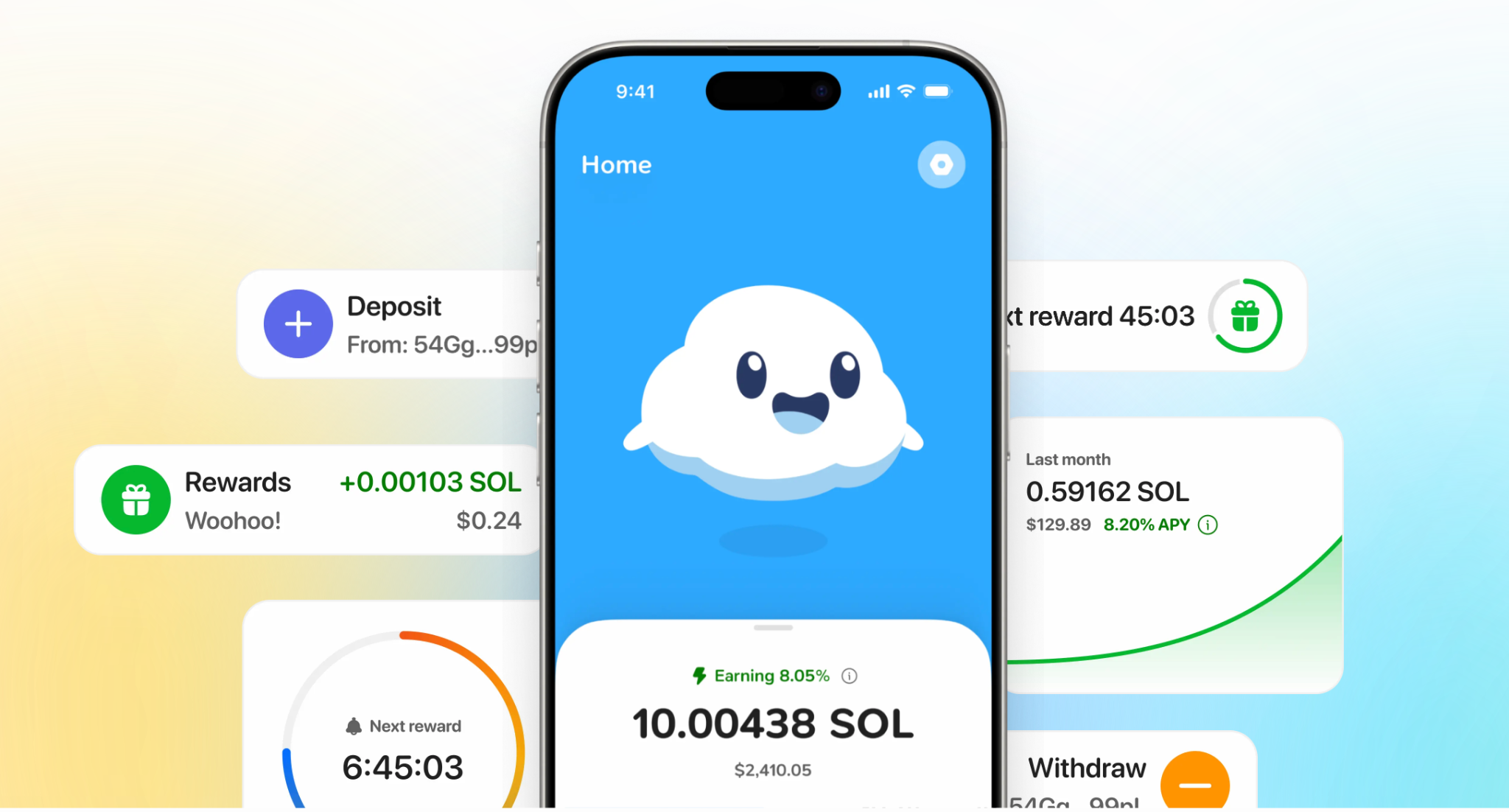
Best for: Users who want a high-yield, mobile-first SOL growth experience without managing validators.
Sanctum is not a wallet that added staking as an afterthought. Instead, the app was thoughtfully shaped around making it simple to grow your SOL from a phone as the primary feature. It launched first on Solana Seeker in March 2026, with iOS and Android availability planned for later.
The headline number is up to 8% SOL rewards with rewards paid daily, meaning you can track earnings without waiting for epoch boundaries or manually checking validator performance. And the rewards you earn auto-compound; every time you earn SOL as a reward, it immediately starts earning yield so that you earn rewards on your rewards.
There are no lock-up periods and no withdrawal fees, so your SOL remains accessible.
Sanctum App’s design philosophy explicitly rejects the trading-first UX that dominates most crypto apps. The Sanctum experience is centered on passive wealth growth, with a companion called Albus and an XP system that encourages health financial habits. For users who find typical DeFi interfaces overwhelming or distracting, Sanctum offers a calmer alternative that still gives users access to the DeFi performance they know and love.
Pros:
- Up to 8% APY SOL reward, above the typical 5-7% native staking benchmark
- Daily reward payments give real-time visibility into earnings without epoch-based delays
- No lock-up periods so SOL remains withdrawable at any time
- No withdrawal fees reduce the cost of accessing your tokens
- Staking-first mobile UX built around yield rather than general wallet management
- Auto-compounding rewards that add up meaningfully long-term
Cons:
- iOS and Android pending which limits access for users without a Solana Seeker device today
Pricing: No app pricing disclosed.
2. Phantom
Best for: Users who want a familiar, mainstream Solana wallet with both native and liquid staking built in.
Phantom is the most widely recognized Solana wallet, and its staking support is well-documented. According to Phantom's help center, users can stake SOL natively by delegating to validators or use liquid staking through PSOL. The documentation clearly explains that delegating does not transfer ownership and that users retain full control of their tokens.
Phantom's strength is familiarity. If you already use Phantom for transactions, NFTs, or token management, staking is one more capability within the same app. The educational materials are strong enough to help a beginner understand validator delegation.
The tradeoff is that Phantom is a wallet first. Staking is one feature among many, and the product experience is not specifically optimized for users whose primary goal is yield tracking and reward maximization.
Pros:
- Native staking supported with direct validator delegation from mobile
- Liquid staking via PSOL gives an alternative path with more liquidity
- Strong documentation makes the staking process approachable for new users
Cons:
- Wallet-first design means staking competes for attention with other features
- Less yield-focused UX compared to apps built specifically around earning rewards
Pricing: No wallet pricing disclosed.
3. Solflare

Best for: Users who want traditional native staking on mobile with full validator transparency.
Solflare provides one of the clearest native staking flows available on a phone. The official mobile staking guide walks through the entire process of selecting a validator, reviewing annual return and total stake, and confirming delegation. Users see validator performance data before committing their SOL.
There are two frictions to know about. Opening a stake account requires a temporary 0.002 SOL network fee (refunded when the account closes). Activation can take up to 3 epochs, which translates to roughly 6 days before rewards begin accruing. For users who value validator choice and transparency over speed, those tradeoffs are reasonable.
Pros:
- Native staking documented on mobile with a step-by-step official guide
- Validator metrics visible before delegation, including annual return and performance
- Clear fee and timing disclosure so users know exactly what to expect
Cons:
- Up to 3-epoch activation means roughly 6 days before rewards start, which is slower than some alternatives
Pricing: 0.002 SOL temporary network fee per stake account that is refunded after opening the account.
4. Backpack
Best for: Users who want one app for wallet management, trading, and flexible staking through both native and liquid paths.
Backpack supports both native staking and liquid staking within its wallet. The native staking flow lets users delegate directly to a validator with a minimum of 0.01 SOL. New stakes activate within 24 hours, which is faster than Solflare's epoch-based timeline. Unstaking requires waiting until the next Solana epoch to receive tokens back.
The liquid staking option uses bpSOL, which Backpack's docs note can boost rewards by up to 15%, though rates vary and change frequently. Having both methods in one interface gives users the flexibility to choose based on their liquidity needs and risk tolerance.
Like Phantom, Backpack is a broad product. Staking is one capability inside a wallet that also handles token management and exchange features. Users who want staking as the primary experience may find the interface less focused than a dedicated staking app.
Pros:
- Native staking with 24-hour activation is faster than the multi-epoch wait on some competitors
- Liquid staking through bpSOL offers a second path with potentially higher (but variable) yield
- Low minimum of 0.01 SOL keeps the entry barrier accessible
Cons:
- Wallet-first product where staking shares screen space with trading and token management
- Variable yield rates on bpSOL make it harder to predict long-term returns
Pricing: No wallet pricing disclosed.
Summary Table
| App | Pricing | Best For |
|---|---|---|
| Sanctum | No app pricing disclosed | High-yield mobile staking with daily rewards |
| Phantom | No wallet pricing disclosed | Familiar wallet with native and liquid staking |
| Solflare | 0.002 SOL temporary fee | Native staking with validator transparency |
| Backpack | No wallet pricing disclosed | Flexible wallet with both staking paths |
If yield and mobile-first design are your top priorities, start with Sanctum App.
Why Sanctum Stands Out on Mobile
Most mobile staking experiences are add-on features inside wallets designed for broader crypto activity. Sanctum inverts that relationship. The app's entire product is built around growing SOL, which means reward visibility, withdrawal flexibility, and staking UX are first-class concerns rather than secondary features.
Daily reward payments and auto-compounding rewards are meaningful differentiators. Native staking ties reward accrual to epoch cycles, and most wallet apps reflect that timing. Sanctum's daily cadence gives users more far more frequent earnings.
The withdrawal terms also set Sanctum apart. No lock-up periods and no withdrawal fees (as stated in launch materials) mean your SOL is not trapped behind multi-day unstaking delays or hidden costs. For mobile users who want liquidity alongside yield, that combination is hard to match among the alternatives covered here.
FAQs
What is a mobile Solana staking app?
A mobile Solana staking app lets you earn yield on SOL directly from your phone. Some apps support native validator delegation, while others offer alternative staking methods. Sanctum focuses specifically on mobile SOL growth with daily rewards and flexible withdrawals.
How do I choose the right mobile staking app?
Start with the staking method: do you want native validator delegation or a simpler yield product? Compare reward frequency, withdrawal rules, and fees across your shortlist. Sanctum fits users who prioritize high yield and a staking-focused mobile experience.
Is Sanctum better than Phantom?
It depends on what you need. Phantom is a full-featured wallet that includes staking as one of many capabilities. Sanctum is a more focused product where staking and SOL growth are the entire experience, with higher marketed yield and daily reward payments.
How does mobile staking relate to liquid staking?
Mobile staking refers to the device context, meaning you are staking from a phone. Liquid staking is one method for earning yield, where you receive a token representing your staked position. Some mobile apps support liquid staking, native staking, or both.
If native staking works, should I still consider Sanctum?
Native staking gives you direct validator selection and control over delegation. Sanctum offers a simpler yield experience with up to 8% APY rewards and daily payouts. The right choice depends on whether you value validator control or a streamlined earning experience.
How quickly can I see staking results?
Timing varies by app and method. Native staking on Solflare can take up to 3 epochs (roughly 6 days) before rewards start, while Backpack activates native stakes within 24 hours. Sanctum markets daily reward payments, providing faster feedback on earnings.
What's the difference between wallet apps and dedicated staking apps?
Wallet apps like Phantom and Backpack handle transactions, token management, and staking within one interface. Dedicated staking apps like Sanctum build the entire product around earning yield. The focused approach typically means better reward visibility and a simpler staking workflow.
What are the best Phantom alternatives for mobile staking?
Solflare is strong for native staking with validator transparency on mobile. Backpack offers flexibility with both native and liquid staking paths and faster activation. Sanctum leads for users focused specifically on mobile yield with daily rewards and no withdrawal friction.